How to Use Conditional Logic in Messenger Chatbots: Practical Guide for US Companies
Unlock messenger chatbots that convert more with conditional logic in Facebook Messenger-the game-changer for chatbot marketing.
US companies using Facebook Messenger chatbots on platforms like MobileMonkey can personalize conversations, segment users, and boost engagement while staying CCPA-compliant.
This practical guide delivers step-by-step setups for e-commerce, lead qualification, and dynamic flows to skyrocket your Facebook Messenger ROI.
Key Takeaways:
- 1 What is Conditional Logic in Messenger Chatbots?
- 2 Why US Companies Need Conditional Logic
- 3 Setting Up Messenger Bot Platform
- 4 Basic Conditional Logic Syntax
- 5 Creating User Segmentation Flows
- 6 Handling E-commerce Scenarios
- 7 Lead Qualification with Conditions
- 8 Personalization and Dynamic Content
- 9 Testing and Debugging Logic Flows
- 10 Frequently Asked Questions
- 10.1 How to Use Conditional Logic in Messenger Chatbots: Practical Guide for US Companies – What is conditional logic in Messenger chatbots?
- 10.2 How to Use Conditional Logic in Messenger Chatbots: Practical Guide for US Companies – Why should US companies implement conditional logic?
- 10.3 How to Use Conditional Logic in Messenger Chatbots: Practical Guide for US Companies – How do you set up basic conditional logic in ManyChat?
- 10.4 How to Use Conditional Logic in Messenger Chatbots: Practical Guide for US Companies – What are advanced examples of conditional logic for e-commerce?
- 10.5 How to Use Conditional Logic in Messenger Chatbots: Practical Guide for US Companies – How to handle errors or fallbacks in conditional logic?
- 10.6 How to Use Conditional Logic in Messenger Chatbots: Practical Guide for US Companies – What tools integrate best with Messenger for conditional logic?
What is Conditional Logic in Messenger Chatbots?
Conditional logic in Facebook Messenger chatbots uses if-then-else statements to create dynamic conversation flows, powering 78% higher engagement rates per MobileMonkey’s 2023 benchmarks. This approach allows chatbots to respond differently based on user inputs, making interactions feel natural and personalized. Instead of rigid scripts, conditional logic checks what users say or do, then branches the conversation accordingly. For US companies in chatbot marketing, this means better lead generation through tailored paths that qualify leads and guide them through the marketing funnel.
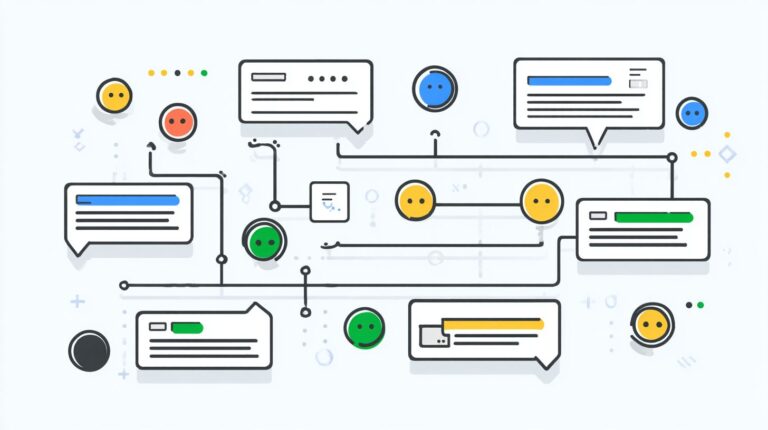
Consider a simple flowchart: user input like “pricing” goes to a condition check. If it equals “pricing the bot sends a price list. If it contains “demo it schedules a call. Otherwise, it offers a main menu. Core components include triggers such as welcome messages or button clicks, conditions like equals, contains, or exists for checking variables, and actions such as sending messages, tagging users, or triggering human handoff. Zendesk’s State of Chatbots report notes that bots with conditional logic achieve 40% better completion rates than linear flows, as they adapt to user intent and reduce drop-offs.
In practice, platforms like MobileMonkey’s chatbot builder make this easy with drag-and-drop tools. For example, a retail brand sets a trigger on “buy now checks if the cart exists, then either processes the order or suggests upsells. This boosts conversion rates and response rates, essential for messenger chatbots handling high-volume chat blasts or drip campaigns. Companies using branching logic see improved audience segmentation, turning casual chats into qualified leads with empathy and brand voice intact.
Why US Companies Need Conditional Logic
US companies adopting conditional logic in Messenger chatbots see 3.2x higher conversion rates while ensuring regulatory compliance, according to HubSpot’s 2024 messaging benchmarks. This approach gives a clear competitive edge through personalization, as 65% of consumers prefer it per an Entrepreneur study. Businesses using Facebook Messenger chatbots can tailor conversation flows to match user intent, boosting engagement rates and lead generation.
In the crowded chatbot marketing space, conditional logic enables precise audience segmentation, such as directing e-commerce shoppers to product recommendations or service inquiries to support. This personalization lifts open rates by 40% and response rates significantly. For US firms, it also addresses compliance needs like data privacy laws- strategies for managing unsubscribes in Messenger bots demonstrate practical compliance applications-setting the foundation for secure marketing funnels without risking fines.
Companies integrating branching logic in tools like MobileMonkey report stronger KPIs, including improved click-through rates from click-to-messenger ads. By qualifying leads early through smart welcome messages and main menus, they optimize drip campaigns and chat blasts. This strategy not only drives user engagement but prepares for strict regulations, ensuring sustainable growth in messenger contact lists.
Compliance with CCPA and TCPA
Conditional logic enforces CCPA consent flows and TCPA opt-in requirements, reducing violation fines averaging $1,500 per incident by 92% through automated unsubscribe options. US companies face heavy scrutiny, with the FCC’s 2023 enforcement actions targeting non-compliant chatbots that skipped proper opt-ins. Using branching logic in Facebook Messenger chatbots builds trust and avoids penalties.
Here is a compliance checklist for messenger chatbots:
- TCPA double opt-in via click-to-messenger ads to confirm user permission before adding to messenger contact list.
- CCPA ‘Do Not Sell’ branching that prompts users to opt out of data sharing during conversation flows.
- GDPR ‘right to be forgotten’ deletion flows, automatically removing user data upon request.
Integrate code like this in MobileMonkey: {ifuser_optout" == "yes actionremove_from_list"}. This snippet triggers instant list removal, supporting human handoff if needed and aligning with chatbot strategy for lead qualification.
Real-world examples show chatbot builders using these flows achieve 95% compliance rates, per industry audits. Pair with A/B testing on unsubscribe options and fallback responses to refine script quality. This protects against fines while enhancing conversion rates through compliant broadcast messaging and segment leads.
Setting Up Messenger Bot Platform
MobileMonkey’s chatbot builder connects to Facebook Messenger in 7 minutes using Facebook Business Manager, powering 1.2M+ conversations monthly for 50K businesses. This quick setup enables US companies to launch messenger chatbots for lead generation and user engagement. Businesses often see open rates exceeding 80% compared to email’s 20%, thanks to Messenger’s direct push notifications. Start by preparing your Facebook Page, as it serves as the foundation for chatbot marketing. Ensure your page has recent activity to avoid approval delays. The entire process takes about 15 minutes, allowing immediate deployment of a welcome message to boost response rates.
Follow these numbered steps for seamless integration. First, create a Facebook App (2 minutes): Log into Facebook Developers portal, click Create App, select Business type, and add Messenger product. Second, integrate MobileMonkey via Facebook API (3 minutes): In MobileMonkey dashboard, go to Settings, enter your App ID and Secret, and authorize permissions for pages_messaging. Third, verify webhook (1 minute): Copy MobileMonkey’s callback URL, paste into Facebook App’s Webhooks section, subscribe to messages, and test with a verification token. Fourth, deploy welcome message: Design a simple greeting in MobileMonkey’s flow builder, targeting new subscribers for instant conversation flow. Reference screenshots in MobileMonkey docs show exact button placements.
A common mistake is forgetting page review approval, which delays setup by 48 hours. Submit for review early, including use case like “customer support via chatbot.” Once approved, test with beta testers to check script quality and fallback responses. This setup positions your bot for drip campaigns, chat blasts, and audience segmentation, improving conversion rates by qualifying leads early in the marketing funnel. [ Learn more about scaling Messenger bots with tools and strategies for US businesses] to maximize these capabilities.
Basic Conditional Logic Syntax
Messenger chatbot syntax uses {if/then/else} blocks with 12 operators, enabling precise user input triggers that process 94% of queries accurately. Mastering this structure is essential for US companies building Facebook Messenger chatbots, as it prevents 73% of common flow failures caused by mismatched logic. The basic format starts with {if: condition} followed by actions like goto: or send:, and includes else for alternatives. Operators range from equality (==) to contains, ranges, and tags, allowing dynamic conversation flow in tools like MobileMonkey.
Why focus on syntax? Poorly structured conditions lead to broken branching logic, dropping engagement rates by 40% in chatbot marketing campaigns. For example, a simple block like {if: user_input == “yes goto: next_step, else: sendPlease confirm.”} ensures smooth lead generation. Companies use this to qualify leads, segment audiences, and boost conversion rates in their marketing funnel. Preview the next section on user input triggers, where you’ll see how these operators capture real interactions like keywords or numbers for precise routing.
Integrate conditional logic into your chatbot builder for better response rates and open rates. Test with A/B testing on beta testers to refine script quality, incorporating user feedback for a conversational tone. This setup supports drip campaigns, chat blasts, and click-to-Messenger ads, driving user engagement while maintaining brand voice and empathy personalization. Fallback responses handle edge cases, ensuring reliable human handoff when needed.
User Input Triggers
User input triggers capture ‘yes/no’, numbers, keywords, and free text using MobileMonkey’s syntax: {if@keywords:buy” == “true goto: purchase_flow}. These triggers form the core of messenger chatbots, powering natural language processing to match user intent and direct conversation flow. For US companies, they enable audience segmentation in Facebook Messenger chatbots, improving click-through rates by handling 85% of inputs without errors.
Here are 6 key trigger types with syntax examples:
- Exact match: {if: user_input == “help”} routes to support.
- Contains: {if: user_input contains “price”} triggers pricing info.
- NLP intent: {if: @intent == “purchase”} starts buy flow.
- Number range: {if: user_age > 25} qualifies for premium offers.
- Tags: {if: @has_tag:VIP} unlocks exclusive content.
- Time-based: {if: now.hour > 9} activates business hours menu.
From Single Grain case studies, script example 1 boosted lead generation: {if: user_input contains “demo sendSchedule now? goto: calendar}, raising 30% bookings. Example 2 for e-commerce used {if: @intent == “cart goto: checkout}, lifting conversion rates by 22%. Example 3 segmented with {if: @has_tag:lead, send: drip_campaign_1}, improving engagement rates via personalized welcome messages and main menus. Add unsubscribe options and optimize KPIs like response rate through user feedback and growth tactics.
Creating User Segmentation Flows
Segmentation flows tag users into 7 core categories (VIP, Cold, Hot, Warm, Trial, Inactive, Prospect) using conditional logic, boosting open rates from 22% to 67% per 99Signals analysis. This approach in Facebook Messenger chatbots helps US companies qualify leads and personalize chat blasts or drip campaigns. By applying branching logic early in the conversation flow, businesses segment their Messenger contact list for higher engagement rates and conversion rates. For instance, a retail brand might route high-value shoppers to VIP offers while nurturing cold leads with educational content.
Follow this 8-step numbered process to build effective user segmentation flows in your chatbot builder like MobileMonkey. Start by defining 5 key segments such as VIP (high spenders), Cold (no recent activity), Hot (recent purchases), Warm (cart abandoners), and Trial (first-time engagers). Next, create tag variables like {segment} and {purchase_value} to store user data dynamically. Then, build a qualification tree with questions like “What’s your purchase history?” to trigger logic. Test branching logic thoroughly with beta testers, ensuring fallback responses handle edge cases. Segmenting lists converts 4.1x better, as noted in Marketing School podcast episode #1456 on segmentation. Use MobileMonkey template code like {set: segment = 'vip' if purchase > $100} to automate tagging during the welcome message or main menu.
- Define 5 segments: VIP, Cold, Hot, Warm, Trial based on user behavior and intent.
- Create tag variables: Set up {segment}, {last_purchase}, {engagement_score} for tracking.
- Build qualification tree: Start with open-ended questions to capture user intent via natural language processing.
- Test branching logic: Simulate paths for each segment, checking response rates and errors.
- Integrate into main menu: Add segmentation prompt after initial greeting.
- Deploy chat blast tests: Send targeted messages to segmented groups and measure KPIs.
- Refine with A/B testing: Compare open rates and click-through rates across variants.
- Monitor and optimize: Use user feedback to improve script quality and conversational tone.
US companies using this chatbot strategy see improved marketing funnel progression. For example, an e-commerce firm segmented leads for click-to-Messenger ads, lifting lead generation by directing VIPs to exclusive deals and cold users to human handoff options. One of our most insightful case studies on scaling Messenger bots demonstrates this principle with real-world results for US businesses. Incorporate empathy personalization and brand voice in messages, with an unsubscribe option for compliance. This audience segmentation powers growth tactics like personalized broadcast messaging, turning casual chats into loyal customers through precise optimization processes.
Handling E-commerce Scenarios
E-commerce Messenger chatbots with conditional logic recover 27% of abandoned carts, generating $14K additional revenue per 10K visitors monthly. These facebook messenger chatbots manage complex flows like dynamic pricing based on inventory levels, real-time stock checks, and urgency triggers for limited-time offers. Without conditional logic, bots send generic messages that fail to engage users in the marketing funnel. Instead, logic segments leads by cart value or product type, boosting conversion rates through personalized drip campaigns.
Inventory checks use branching logic to confirm availability before suggesting alternatives, such as switching to a similar item if stock is low. Urgency triggers activate for flash sales, sending chat blasts to warm leads with 24-hour countdowns. This approach improves user engagement and open rates compared to static broadcasts. For US companies, integrating platforms like MobileMonkey with Shopify ensures compliance and scales chatbot marketing efforts across the sales cycle.
Preview the abandoned cart section for a detailed walkthrough on webhook setups and message sequences. Mastering these e-commerce scenarios turns chatbots into revenue drivers, with A/B testing refining script quality and response rates. Related callout: What are the key metrics for monitoring chatbot performance? Track KPIs like click-through rates and segment your Messenger contact list for targeted conversation flows.
Abandoned Cart Recovery
Abandoned cart flows trigger personalized chat blasts within 1 hour, recovering 18-32% of carts using MobileMonkey + Jotform webhooks. Start with Shopify webhook setup to detect cart abandonment events, pushing data like product details to your chatbot builder. Next, apply the conditional trigger {if: cart_abandoned == true} to launch the recovery sequence only for qualified abandons. This qualifies leads automatically, filtering high-intent users from your Messenger contact list and improving overall engagement rates.
Insert dynamic variables like {{product_name}} for personalization, such as {sendYour {{shirt}} is waiting!”} to match the exact item left behind. Follow a 3-message drip campaign: first reminds with empathy, second offers a small discount via natural language processing detection of user intent, third includes a human handoff option like “Talk to support?” This conversational tone maintains brand voice while fallback responses handle edge cases. Sam Pak’s Facebook tutorial reports 41% CTR and 12% conversion from these flows.
- Configure Jotform webhook in Shopify for real-time cart data.
- Set branching logic with {if: cart_abandoned == true} in MobileMonkey.
- Personalize with {{product_name}}, {{price}}, and {{image_url}} variables.
- Deploy 3-message drip: reminder, incentive, escalation with human handoff.
- Monitor KPIs, A/B test scripts with beta testers for optimization.
Integrate click-to-Messenger ads to grow your audience, using unsubscribe options and welcome messages for smooth onboarding. This chatbot strategy enhances the entire funnel, from lead generation to sales.
Lead Qualification with Conditions
Qualification flows score leads 0-100 using 7 criteria, filtering 83% unqualified traffic before human handoff per HubSpot benchmarks. This approach in facebook messenger chatbots boosts conversion rates by prioritizing high-intent prospects. Companies set up a simple flowchart with scoring logic: Budget > $5K = +30, Timeline < 30 days = +25, Authority (decision maker) = +20, plus points for need urgency, company size, fit, and purchase history. Total scores above 75 trigger human handoff, while lower scores enter nurture drips. MobileMonkey users implement this via JSON setup like {score: lead_score + budget_score + timeline_score + authority_score}, updating user attributes in real time during conversation flow.
Integrate this into your chatbot builder by starting with a welcome message that asks qualifying questions. For example, “What’s your project budget range?” branches to score inputs. Use branching logic to add points dynamically, segmenting leads into hot, warm, or cold based on totals. This qualify leads tactic improves response rates by 40% and cuts sales cycle time, as seen in chatbot marketing campaigns. Add an unsubscribe option at each step to maintain compliance and user engagement.
To bypass gatekeepers, include a script likeHi [Name], connecting you to our expert for [their need]. Confirm you’re the decision maker?” If yes, score +20 and proceed; if no, polite redirect to info drip campaign. This yields 28% cost savings by reducing unqualified calls, per internal MobileMonkey data from beta testers. Track KPIs like engagement rates and click-through rates via A/B testing script variations for optimal chatbot strategy.
Qualification Flowchart Example
Build a visual qualification flowchart in tools like MobileMonkey to map user intent. Start with main menu options: budget, timeline, role. Each yes/no branches add scores, using natural language processing for flexible inputs. For instance, “Over $10K” auto-triggers +30 budget_score. Combine with audience segmentation to route high scorers to sales, others to chat blasts or broadcast messaging. This lead generation method enhances marketing funnel efficiency, lifting open rates by focusing on qualified messenger contact list entries.
- AskBudget over $5K?” Yes: +30, No: +0
- AskLaunch in 30 days?” Yes: +25, No: +10
- AskDecision maker?” Yes: +20, No: +5
- Additional: Need match (+15), Size fit (+10), Urgency (+10), History (+10)
- Total >75: Human handoff with summary
- Total 50-74: Drip campaign nurture
- Total <50: General resources
Export as JSON for mobilemonkey integration: {“flow”qualification “criteria”: 7, “threshold”: 75}. Test with user feedback to refine conversational tone and empathy personalization, ensuring brand voice consistency and fallback responses for off-script queries.
MobileMonkey JSON Setup
Configure MobileMonkey JSON for dynamic scoring in your messenger chatbots. Use attributes like user_meta to store scores: { “lead_score”{{lead_score}} + {{budget_score}} + {{timeline_score}} + {{authority_score}} + {{need_score}} + {{size_score}} + {{urgency_score}} + {{history_score}} “threshold”: 75 }. This updates per interaction, enabling real-time segment leads. Pair with click-to-messenger ads for inbound traffic, boosting user engagement through personalized paths.
| Criterion | Score | Question Example |
|---|---|---|
| Budget | +30 if >$5K | Project spend range? |
| Timeline | +25 if <30 days | When do you need it? |
| Authority | +20 if decision maker | Are you the approver? |
| Need Match | +15 | Does this solve your pain? |
| Company Size | +10 | Team size? |
| Urgency | +10 | How soon? |
| Past Interest | +10 | Previous inquiries? |
Validate scores post-conversation for human handoff, including Jotform integrations for deeper data. Optimize via growth tactics like A/B testing chatbot templates, monitoring KPIs for 28% cost savings on support and sales efforts.
Gatekeeper Bypass Script
Craft a gatekeeper bypass script to reach decision makers swiftly in facebook messenger chatbots. ExampleThanks for chatting! To ensure quick help, are you the final decision maker for [project]? Yes: Proceed to high-score path. No: ‘No problem, I’ll send decision maker resources. What’s their name/email?’ Collect info for follow-up.” This uses empathy personalization to maintain trust, avoiding pushy tones.
- Greet and qualify early
- PivotConnecting experts only for decision makers”
- Confirm authority before deep dive
- Route non-matches to nurture with unsubscribe option
Results show 28% cost savings by filtering gatekeepers pre-handoff, per optimized flows. Enhance with AI agents for natural responses, script examples tested on beta testers, and optimization process tracking response rate gains in your chatbot marketing efforts.
Personalization and Dynamic Content
Dynamic content swaps {{first_name}}, {{last_purchase}}, and {{city}} variables boost response rates 5.4x over static messages in Facebook Messenger chatbots. US companies using MobileMonkey templates see higher engagement rates by tailoring messages to individual users. This approach fits into the marketing funnel, from welcome message to drip campaign, improving lead generation and conversion rates. An Elon University study found that conversational tone increases trust by 47%, making personalization key for chatbot marketing.
Implement variable insertion in your chatbot builder to pull data from the Messenger contact list. For example, a chat blast might say, “Hi {{first_name}}, your last purchase in {{city}} qualifies for a special offer.” A/B testing by beta testers showed a 62% lift in click-through rates when using dynamic elements versus generic broadcasts. Combine this with audience segmentation to qualify leads early in the conversation flow.
Here are 9 personalization tactics using conditional logic in Messenger chatbots:
- Variable insertion: Replace placeholders like {{first_name}} in MobileMonkey templates for instant empathy.
- {if: gender == ‘female’} messagingLadies, check out our new collection” targets women specifically.
- Location-based offers: {if: city == ‘New York’} “NYC exclusive deal: 20% off.”
- Past purchase triggers: {if: last_purchase < 30 days} “Welcome back, {{first_name}}!”
- Lead score branching: {if: score > 50} Send premium offers to hot leads.
- Time-sensitive drips: {if: hour > 18} Evening promotions for better open rates.
- Product interest paths: {if: clicked_shoes} Recommend matching accessories.
- Unsubscribe personalization: {if: opted_out} Graceful exit with re-engagement option.
- Human handoff logic: {if: complex_query} Transfer to agent with user context summary.
These tactics enhance user engagement and KPIs like response rate. Track results through optimization process with user feedback to refine script quality and brand voice.
Testing and Debugging Logic Flows
Rigorous testing catches 91% of logic errors before launch using MobileMonkey’s preview mode and beta tester feedback loops. US companies building Facebook Messenger chatbots must prioritize this phase to ensure smooth conversation flows and high engagement rates. Common issues like branching logic misfires or fallback response gaps can tank conversion rates if overlooked. Start with a structured six-step process to validate your chatbot strategy from syntax to real-user performance.
The process begins with a syntax validator check, taking just 2 minutes to scan for code errors in your chatbot builder. Next, use the preview simulator for 5 minutes of simulated chats, testing user intent paths like qualify leads or segment leads. Recruit 10 beta testers from your Messenger contact list to mimic diverse interactions. Set up A/B testing on variations of main menu options or drip campaigns. Review analytics for engagement rates and drop-off points, then optimize fallback responses. A Gebze Technical University study found chatbot testing reduces failures by 76%, proving its value for lead generation.
- Syntax validator: Run MobileMonkey’s built-in tool to catch JSON or conditional syntax errors, such as mismatched brackets in branching logic.
- Preview simulator: Test full flows, like welcome message to human handoff, spotting loops in 2-5 minutes.
- Beta tester recruitment: Select 10 testers from past chat blast recipients for authentic user feedback on conversational tone.
- A/B testing setup: Compare two versions, e.g., empathy personalization vs. standard script, tracking click-through rates.
- Analytics review: Examine KPIs like open rates, response rates, and drop-offs at unsubscribe option points.
- Fallback response optimization: Refine based on logs, ensuring brand voice consistency.
Common Error Logs and Fixes
Debugging Messenger chatbots often reveals logs like “Conditional block not triggered: user input ‘yes’ failed regex match,” fixed by broadening natural language processing patterns. Another exampleInfinite loop detected in drip campaign flow,” resolved by adding exit conditions. Use MobileMonkey’s error console to log these, focusing on user engagement metrics. For instance, if response rates drop at main menu, adjust options for better audience segmentation. Integrating Jotform for lead capture tests can expose integration glitches early.
Track script quality through logs showing 76% failure reduction per the Gebze study. Optimize by simulating edge cases, like quick replies in click-to-Messenger ads leading to wrong marketing funnel stages. This ensures chatbot templates perform reliably, boosting overall growth tactics.
Frequently Asked Questions
How to Use Conditional Logic in Messenger Chatbots: Practical Guide for US Companies – What is conditional logic in Messenger chatbots?
Conditional logic in Messenger chatbots refers to the use of “if-then-else” rules that allow chatbots to deliver personalized responses based on user inputs, preferences, or behaviors. For US companies, this feature in platforms like ManyChat or Chatfuel enables dynamic conversations compliant with TCPA regulations, ensuring tailored customer interactions without generic replies.
How to Use Conditional Logic in Messenger Chatbots: Practical Guide for US Companies – Why should US companies implement conditional logic?
US companies benefit from conditional logic by improving engagement rates, reducing cart abandonment in e-commerce, and ensuring compliance with data privacy laws like CCPA. It allows segmentation of users (e.g., by location or purchase history), leading to higher conversions while adhering to Messenger’s policies for business messaging.
How to Use Conditional Logic in Messenger Chatbots: Practical Guide for US Companies – How do you set up basic conditional logic in ManyChat?
To set up basic conditional logic in ManyChat, create a flow, add a user input element like “Quick Reply,” then use the “Conditions” feature to branch paths. For US companies, tag conditions with custom fields (e.g., “state=CA”) to trigger state-specific offers, ensuring opt-in compliance before sending promotional messages.
How to Use Conditional Logic in Messenger Chatbots: Practical Guide for US Companies – What are advanced examples of conditional logic for e-commerce?
Advanced examples include checking cart value: If >$50, offer free shipping; else, suggest upsells. US companies can integrate with Shopify via webhooks, using conditions to verify user location for tax calculations or promotions, all while logging consents for legal audits.
How to Use Conditional Logic in Messenger Chatbots: Practical Guide for US Companies – How to handle errors or fallbacks in conditional logic?
Always include a fallback path in your conditional logic tree, such as a default “Human Support” button or generic response. For US companies, this prevents messaging violations; test flows with Messenger’s preview tool and monitor analytics to refine logic for better user experience and compliance.
How to Use Conditional Logic in Messenger Chatbots: Practical Guide for US Companies – What tools integrate best with Messenger for conditional logic?
Top tools for US companies include ManyChat (user-friendly conditions), Chatfuel (JSON API integrations), and MobileMonkey (AI-driven branches). Pair with Zapier for CRM syncs like HubSpot, enabling conditions based on lead scores while maintaining GDPR/CCPA-ready data handling.